Images compressed into words.
Any AI is the decoder.
JAI is an open image format for a world where generating pictures is cheap and local, and moving them is not. A JAI image is a few hundred bytes of description that any generative model turns back into the picture: different pixels, same image.
jai:A magical castle;style=anime
Those 32 bytes are a complete JAI image. The picture beside it, 189 KB as WebP, is one way to decode them.
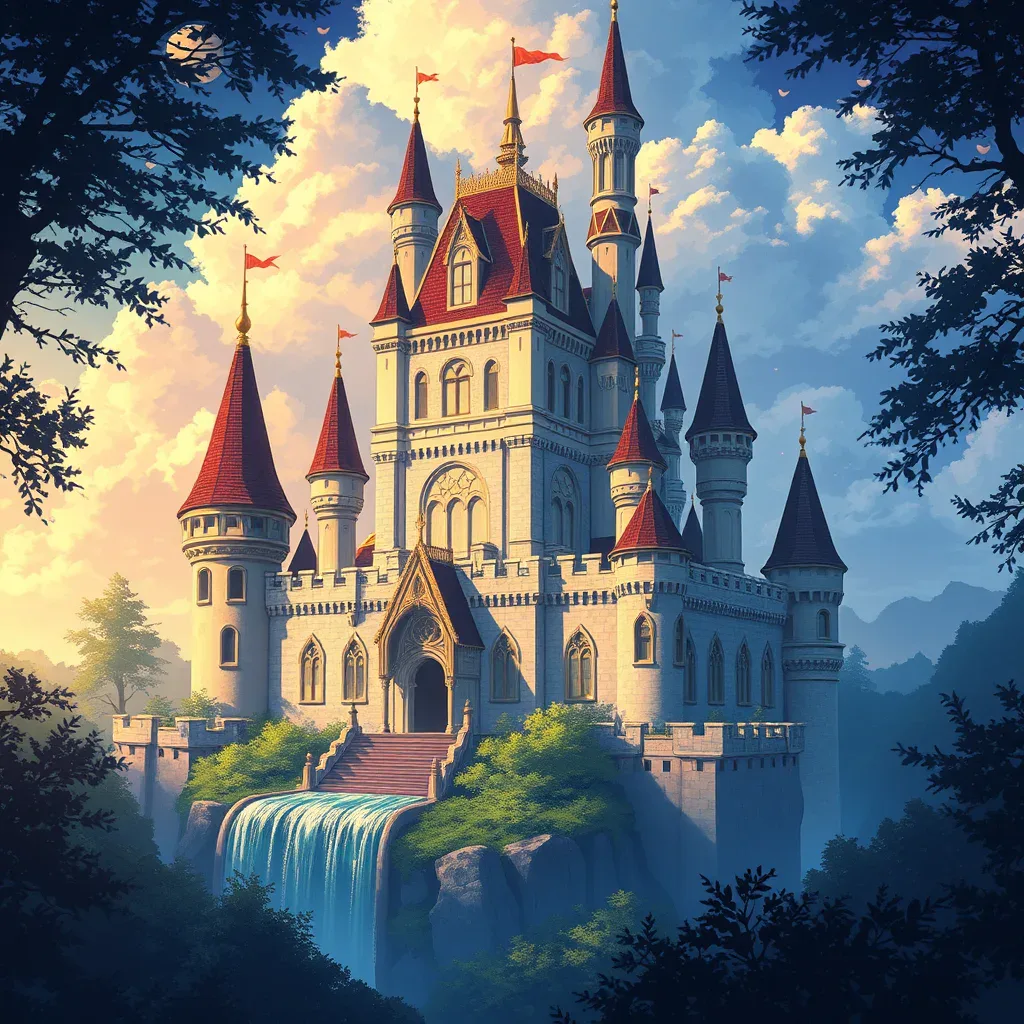
jai:A magical castle;style=anime by FLUX.1 schnell. Another renderer would draw a different castle.A description is compression
JPEG throws away detail you will not miss. JAI goes to the far end of the same curve and keeps only what you would say about the picture. A generative model has already learned what the world looks like, so a few hundred bytes are enough for it to draw the rest.
Little bandwidth
Spacecraft, ships, satellite links and text-only radio can carry a sentence where they cannot carry a photograph. A receiver with a GPU draws the picture.
Local generation
Image models are moving onto ordinary GPUs at well under a second. When decoding is local and free, browsers can skip downloading the raster altogether.
An audience of one
Your decoder draws the pixels, so you can have them your way: adapted to your culture, softened, adjusted for your eyesight, or just in a mood you enjoy.
Today most renders still go to a hosted provider through an API key, which is fine for demos and personal renders, and the reason the reference viewer asks before every render. Read the full argument.
One document, three spellings
For people
jai:A magical castle;style=animeDescription first, then ;key=value settings. Ordinary semicolons inside the description are fine.
For programs
{"jai":1,"prompt":"A magical castle","style":"anime"}Every value is a string or a list of strings. One canonical byte sequence per document, so every image has a stable identity.
For files and the web
castle.jai      image/jai
gzip( JSON )
A .jai file is the JSON, gzip-compressed. It can be served, linked and embedded like any other image file.
Five rules cover almost everything
- Describe the picture first, as you would to someone on the phone: what is in it, where, the light, the medium.
- Add settings after a semicolon, each as
name=value:;style=watercolor,;aspect=16:9,;avoid=text. - Put
jai:in front when the place you write in does not already say it is JAI. - Repeat a setting for several items:
;style=ink;style=loose. A model preference is only a preference. - If the description starts with
word=, begin withprompt=instead.
A red bicycle leaning against a whitewashed wall, afternoon sunjai:A lighthouse on a cliff in a storm;style=watercolor;aspect=3:2jai:A wizard in a doorway; behind him, a dragon sleeps;style=ink;avoid=textjai:A narrow cobbled street at night, lit by neon signs, wet reflections;mode=transform;strength=0.6The standard settings are style, avoid, aspect, model, mode, strength, seed, source, preview and animate. What each one means.
Works in every browser today
Put JAI next to a normal image with HTML's own format negotiation. Browsers that do not understand image/jai skip it and show the PNG, without downloading the .jai. A JAI-aware browser or extension can render the description instead, when the reader chooses.
With fallback pixels (recommended)
<picture>
  <source type="image/jai" srcset="castle.jai">
  <img src="castle.png" alt="A magical castle at dusk">
</picture>
Inline, no extra file
<img src="castle.png" alt="A magical castle at dusk"
     data-jai="A magical castle at dusk;style=anime">
JAI in src, like a data URI
<img src="data:image/jai,A%20magical%20castle;style=anime"
     alt="A magical castle" width="800" height="600">
The pure form: the image is the description, with no pixels at all. It needs a JAI-aware viewer; everywhere else readers see the alt text, so it must be real prose.
The reader is always in control: nothing is rendered without their chosen provider and their consent, and the original image is always one click away. The reference browser extension shows how.
An installable Agent Skill
The JAI skill teaches any coding agent or assistant to write JAI from a request, describe an existing image as JAI, translate Midjourney or Stable Diffusion prompts, shorten long descriptions, embed JAI in HTML and Markdown, and validate the result.
Install
Copy the folder into your agent's skills directory, for example for Claude Code:
mkdir -p ~/.claude/skills/jai
curl -o ~/.claude/skills/jai/SKILL.md \
  https://jai.gnist.ai/SKILL.md
Or point any assistant at the URL and ask it to follow the instructions.
An open standard, not a product
Specification
Precise enough for independent parsers and renderers: a normative parsing algorithm, canonical forms, security requirements.
Conformance tests
361 machine-readable fixtures. Two implementations that pass them agree on every input, including malformed ones.
jai.js
A dependency-free reference implementation for browsers and Node. The playground runs on it.
Everything is public domain (CC0). No account, registry or hosted service is needed, and no inference goes through anyone's servers but the reader's chosen provider.